Overview of Task 3
For task three we were required to explore technologies appropriate to teaching and learning, and create an authentic learning environment to share with other teachers. The task involved the forming of groups, where students were asked to create a small sharable educational resource, on a educational topic of our choice. The creation of the resource had to include an authentic learning environment which was to be presented on a wiki. The wiki had to introduce the educational topic and the student group that the task would be suitable for, as well as one of each of the following resources: websites, interactive whiteboard resources, movies, documents and social networking sites. The task also included creating a PowerPoint or keyNote presentation on the making of the resource.
Kid Fit Challenge
The group I was placed in consisted of Hayley, Amy and Niya all fellow student's studying EDN113. For this task as a group we decided upon creating our educational topic to be about Children's 'Health and Physical Education' as we all felt that the topic could be incorporated into a lesson plan. We first discussed how we could create an authentic learning environment based on physical education and from this the suggestion was made that student's could create a exercise routine that they personally designed and carried out over a number of lesson's. This idea was liked by all group members and further ideas were formed such as ways in which we could incorporate technology and the required resources for this task.
Through Skype, email's and phone call's the group came to the conclusion that our group name was 'Kid Fit Challenge,' physical education was the topic, the suitable year level was Year 5/6, the lesson plan was focussed on promoting physical education to student's, and that this would be promoted through planning lesson's that encouraged students to have control and improve on their fitness ability, by designing and following their own fitness routine. As a group we also came to the decision that the following interactive whiteboard resources, websites, movies, documents and social networking sight were to be included on our wiki as they related to our topic.
Resources
Websites
Movies
Documents
- Good for Kids Good for Life, Fundamental Movement Skills pdf
- Department of Education and Training Western Australia Middle Childhood: Health and Physical Education
Social Networking Sight
Interactive Whiteboard Resources
Outcome of the Task
When first reading this task I was a little overwhelmed and unsure of where to even begin with this assignment. However these feelings lifted once all group members had made contact with each other and we started to share our thoughts and ideas. Through our conversations we resolved and covered the basic requirements of this task and as we started compiling our information on to our wiki, further ideas were implemented and the creation of our wiki started to develop. As our progress started to grow and ideas became clear and my feelings towards this task changed as I felt more confident with our groups topic, and using the wiki.
All group members contributed equally to the creation of our wiki and the work load was evenly shared. We were allocated a page each to work on, and new the requirements for the particular page as this was discussed beforehand. We worked well as a team and have successfully created an authentic learning environment that can be shared amongst other teachers. I am thankful for the opportunity to work with Niya, Hayley and Amy and am happy with, and proud of our finished product. Well done girls!
Please click 'Kid-Fit Challenge' to view our wiki creation.
Personal Contribution to the wiki 'Kid Fit Challenge'
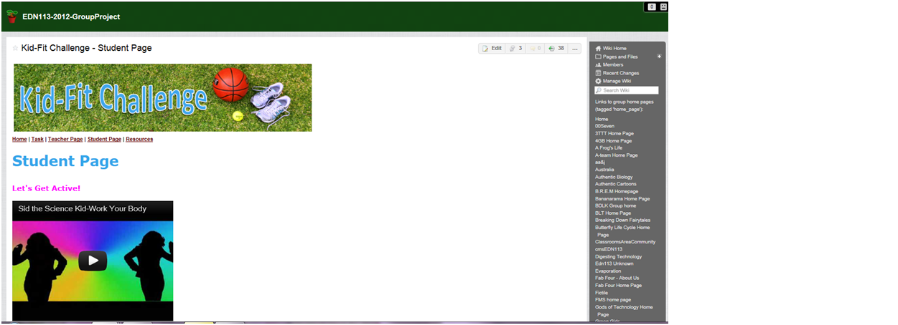
I personal contributed to the wiki 'Kid Fit Challenge' by creating the 'student page.' The purpose of this page was to include a place where students could go to find the resources that they needed to complete the challenge. The creation of the student page required me to research resources that the group intended for the student's to use, as well as referring to Niya's 'teacher page' to incorporate the suggested resources in the teacher's lesson plans.
Below are the resources included on the 'student's page.'
- TeacherTube: This site was used as a place for student's to upload their video to.
- Edublogs: A place where student's could blog their progress.
- WhatsWhat.me: A social media website designed for children to communicate
- Cool Tools for School: A website that the student's could use to find resources to help complete the task.
Below is a screen shot of the 'student page' from the wiki 'Kid Fit Challenge.'
(PetStoreLady,2009) | (cjtheworkoutkid,2011) |
References
cjtheworkoutkid,(2011, May 10). Kid Fitness Video by The Workout Kid. Retrieved May, 18
from http://www.youtube.com/watch?feature=player_embedded&v=aE8HyN0zJcw
PetStoreLady.(2009/11/03). Sid The Science Kid Work Your Body. Retrieved May, 18 from
